

Did you recently add a new contact on your iPhone and are having trouble finding it? No problem! In this guide, we’ll, with exact screenshots and proven multiple methods, learn how to find recently added contacts on iPhone. I’ve done this on my iPhone; this is how it will go for you! Just keep reading!
So, How Do I Find Recently Added Contacts on My iPhone?
To find recently added contacts on your iPhone, create a Recent Contacts Shortcut by using the shortcut feature in your iPhone. One can use the Spotlight Search Method or get help from any third-party application after downloading it from the App Store.
Undoubtedly, you can find the recently updated or added contacts on your iPhone in multiple ways. The default Contacts app on your iPhone device might not have this facility. That’s because it can only provide you a contact if it’s saved in it and you have a name in your mind.
You can use the search bar and look for that specific content. But to keep a track record of recently added contacts, you’ll have to make more effort!
Different Ways To Look For Newly or Recently Added Contacts on iPhone:
There is no single method to do this thing. That’s because if things are working for me, they might not work for you.
So, we bring down and everything related to finding the most updated contacts on the iPhone. With these methods, you can try alternatively and determine which one works best for you!
Pro Tip: These methods are applicable for all iPhone Devices, whether you have the iPhone X or the Latest iPhone 14 or 15 Pro Max. Just follow the guidelines and apply!
Method 1: Locate Recently Added Contents on iPhone Using Shortcut Method!
The first method is a bit complicated for people who don’t explore the iPhone features in-depth. Setting a Shortcut for finding recently added contacts on your iPhone will require a maximum of five minutes.
But once it’s done, you won’t need to load your device with other apps or go for other technical methods. So, here is how you can create an iPhone Shortcut for finding the Recently Added Contacts.
First, search and open Shortcuts on your iPhone! Click on the + Icon to add a new Shortcut. Click Add Action.
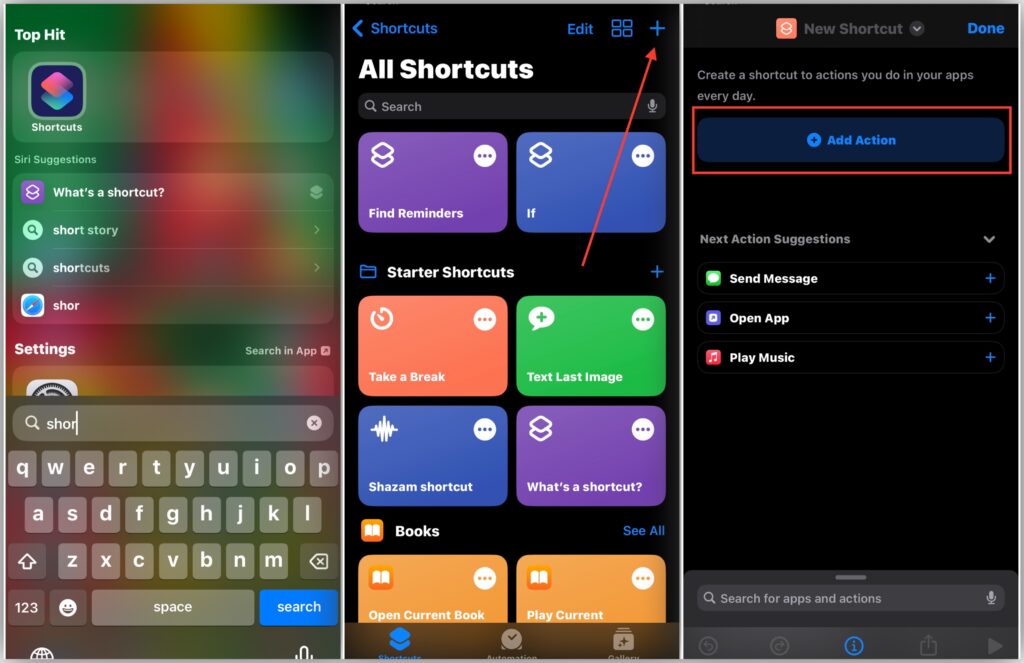
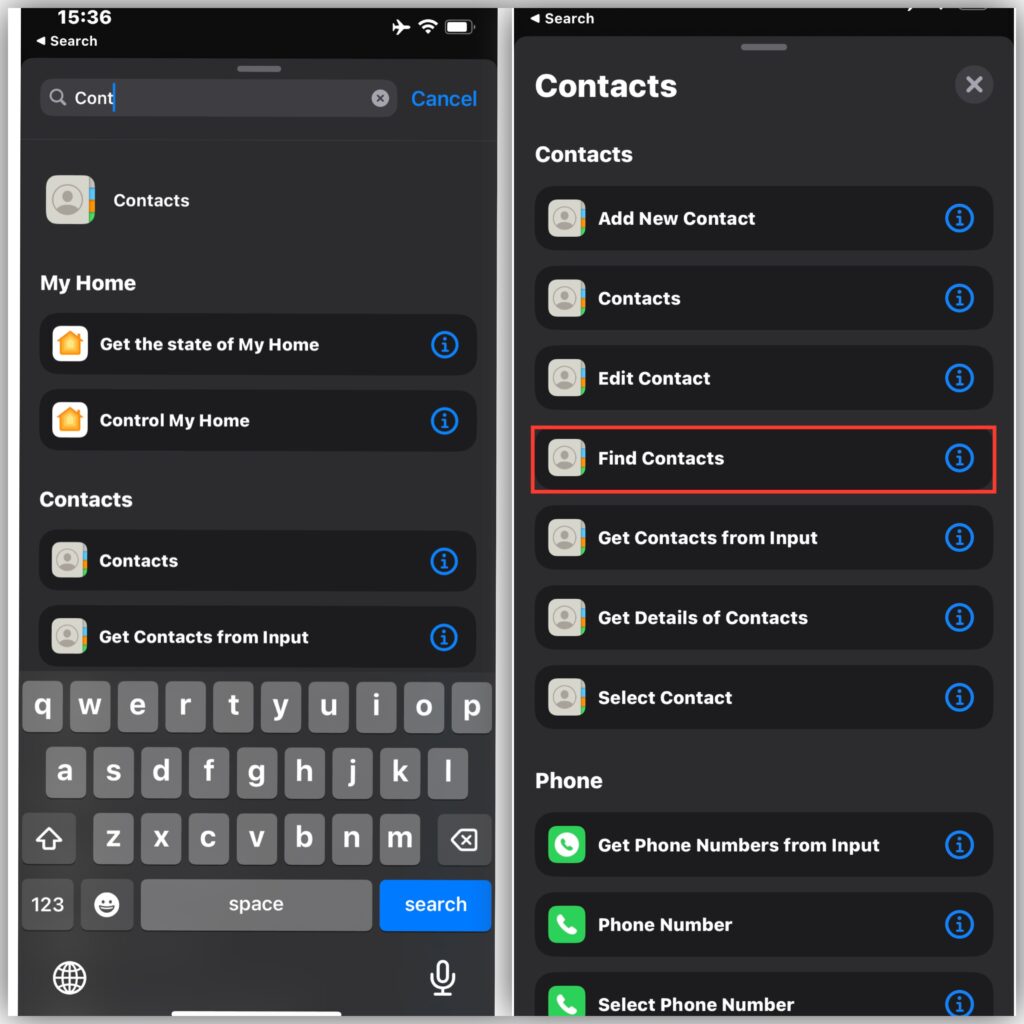
Once done, use the search bar to search Contacts and click to add Contacts. There, you’ll need to add Find Contacts from the list.
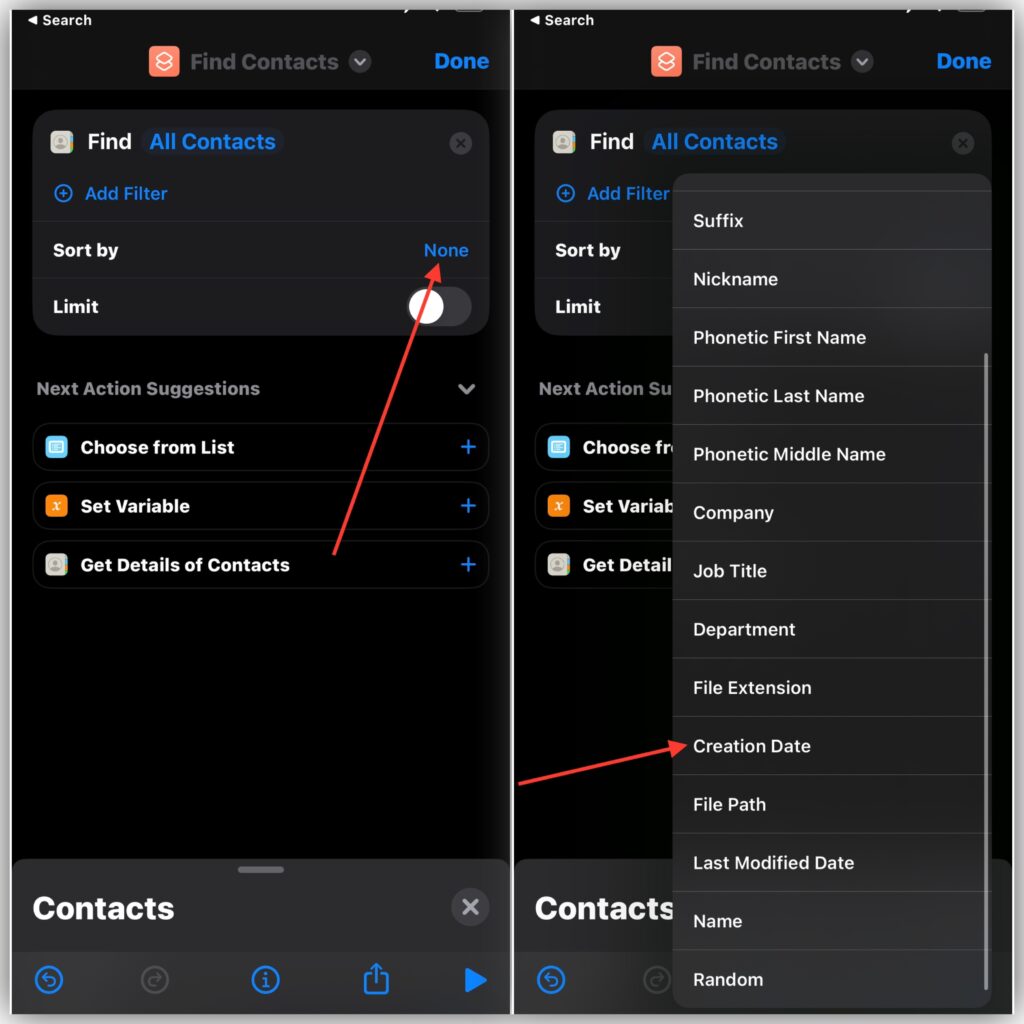
After doing so, click on Sort by and scroll down to add Creation Date instead of none. For Order, add Latest First. Also, turn on the Limit to 5 or any number of contacts!
Now, go down and search Show Result in the Search Bar. Click the Show Result yellow icon and select Contacts.
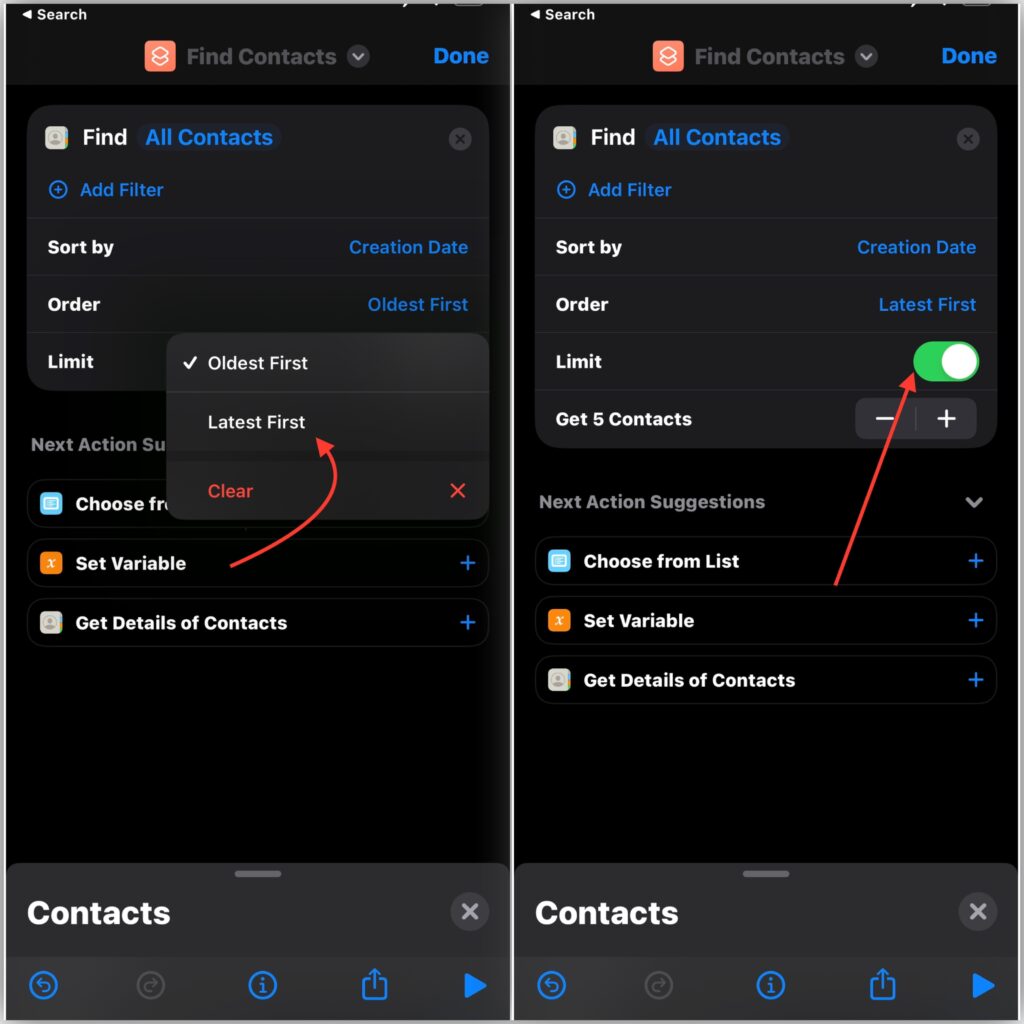
Click on done, and you’ll have your Shortcut ready to Find the Recent Contacts on an iPhone.
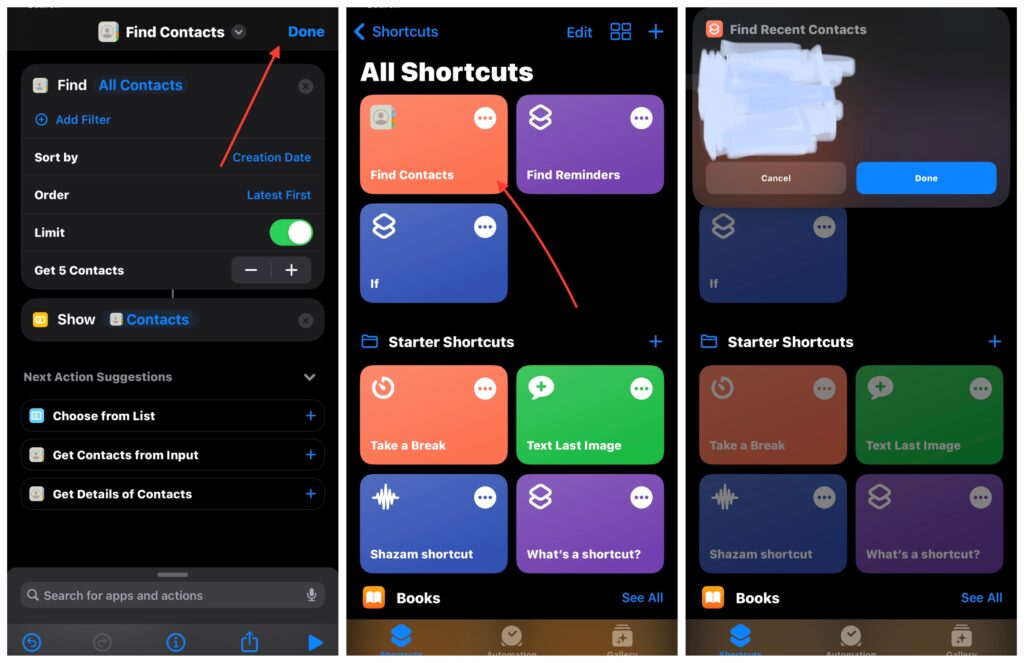
Now, you can click the shortcut for once, and it will show you those limited 5 or whatever limited contacts on your iPhone screen as recently added contacts. See, it’s pretty simple and the lifetime method of finding all those contacts you recently have added to your iPhone!
Method 2: Use Spotlight to Indicate Recent Contacts
Using a spotlight is another great way of indicating recently added contacts on the iPhone. You can use this feature freely to find out whom you just have made your friend. For this, you might have remembered a little or any details about that person.
You can use the Search option on the iPhone and type that specific information in it. If it reveals anything related to the recently added contact you are looking for, just open the Contacts app and look for real details now.
Hence, you’ll be able to find who has been updated in your Contact list in a short while!
Method 3: Use Various Third-Party Apps
As stated earlier in this article, the Contacts App on your iPhone device is merely an app that can keep the data of all the contacts.
If you don’t have a name to remember, you’ll have to do much hard work to find that contact. It also doesn’t keep the information of those contacts that you just have deleted or recently added.
However, by exploring the App Store, you can find multiple third-party apps to help you in this matter. Below, I’ve made a table of all those possible apps that can be used to find recently added contacts on iPhone. Please have a look!
| App Name | Developers | Functionality | Paid/Free |
| Recent Contacts Newest Digits | Plexus Studios. | Order contacts by the creation or Modified date | Free |
| Recent Contacts | Kyle Gorlick | Information about when contact was added or modified | Costs $2.99. |
| Contacts last entries & search | Peter Breitling | Order contacts by creation or Modified date | Free |
| iContacts+ | Jeonghwan Kim | Having multiple and advanced features | $0.99 |
| Recents | Brian Donohue | It’s not that fancy, but contacts sorted with recent adding | $0.99 |
Hence, you can install any of these apps from the App Store on your iPhone device, and each one of these will help you find recently added contacts on your iPhone. There is no rocket science in this!
Method 4: Add Contacts to Favorite
One of the good things you can do while saving a newly added contact is to put it into your favourites. Yes, there is a favourite contact option. However, follow the steps below to put your desired contact into that.
First, open the Phone App and go to Contacts.
Select a Specific Contact and scroll down a little once the details are present before you. There, you’ll find the Add to Favorites option. Click on it, and your contact will be saved to your favorites for easy usage in the future.
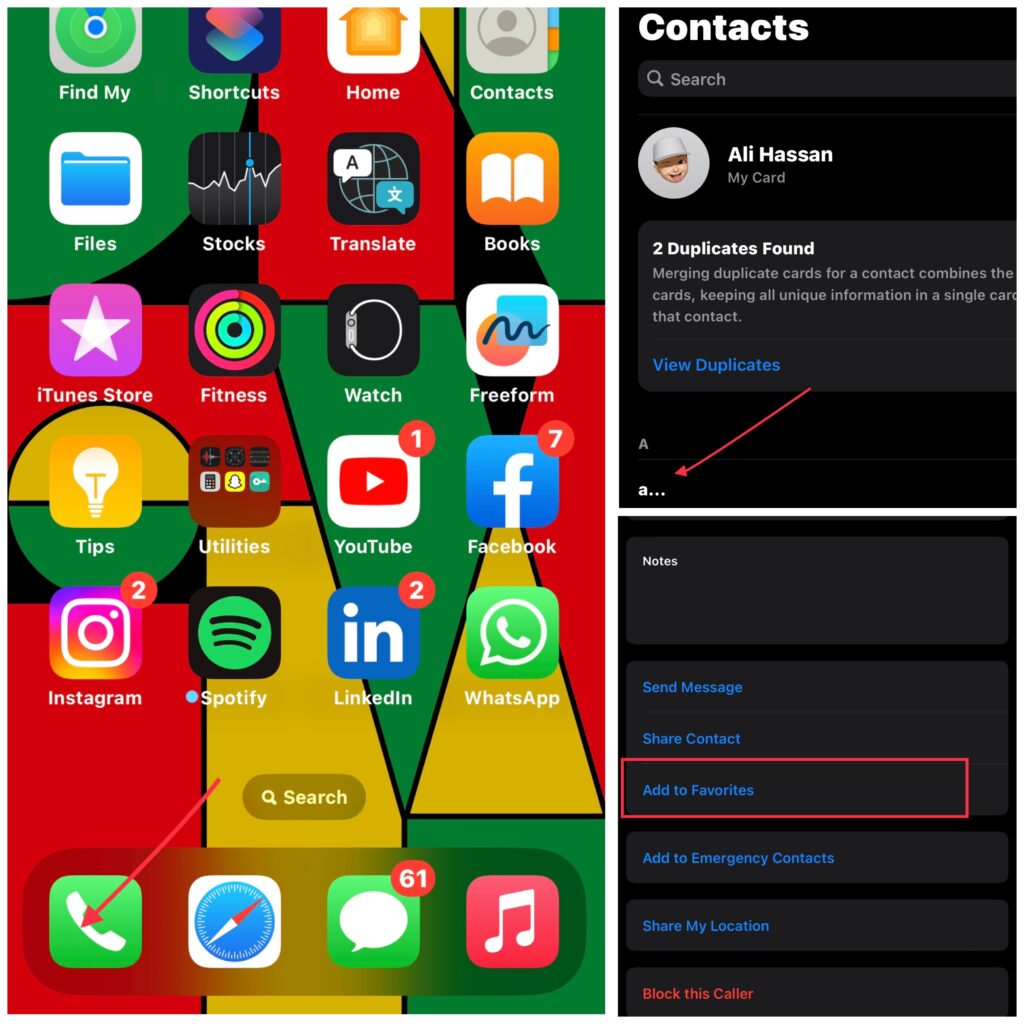
So, whenever you need to find a specific contact in the future, you can go to the favorite contacts and look it there. You’ll have it in no time!
Method 5: Add Desired Contacts to a List:
Another way to find the recently added contacts on iPhone is to put them in a list. Just where you are in the Phone App, look for the list option in the upper left Corner.
On the next Window, you’ll have the Add List option on the Upper Right Corner of your Mobile Screen. Click on it and select any ID. For example, you can select iCloud ID or your Gmail ID, depending on what you have used to log in to your device.
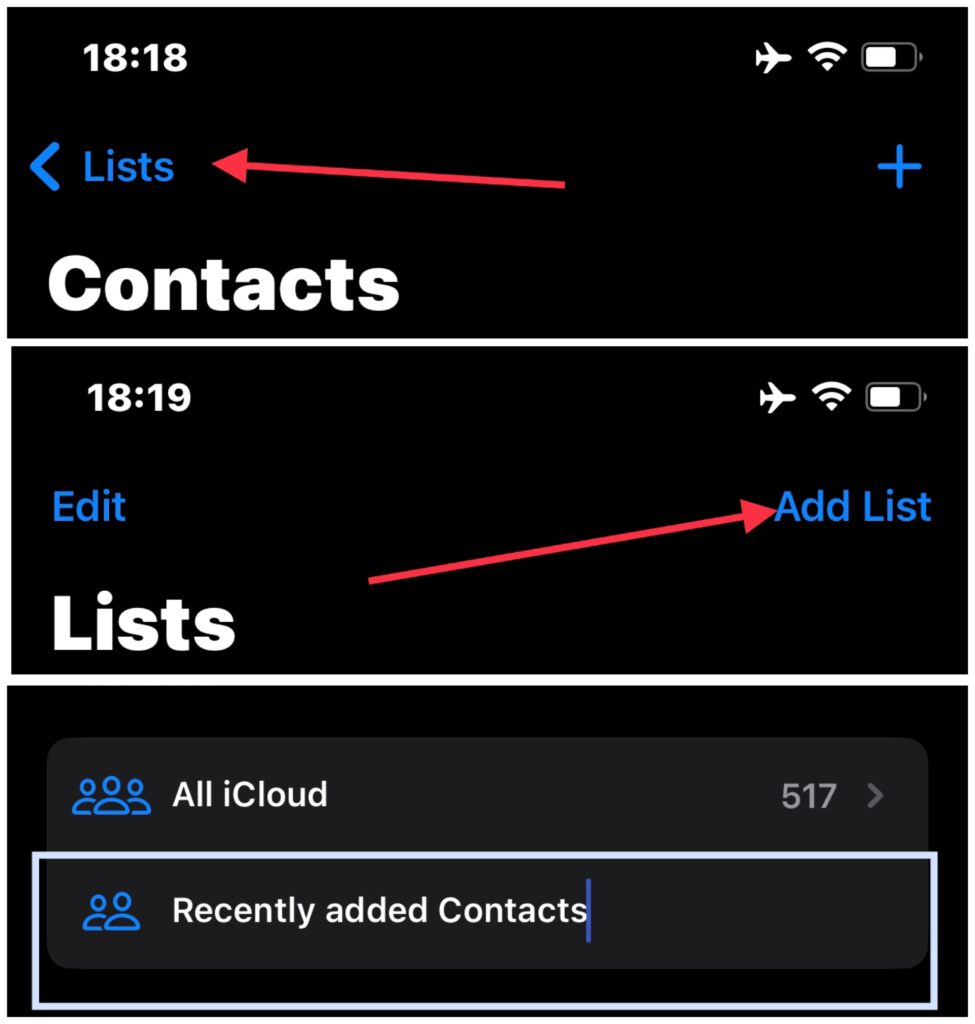
Name that list as Recently Added Contacts. Now you can click on that list and add all those important contacts to it. This way, it would be much easier to find your desired contact in the future.
How To Find Recently Added Contacts on iPhone 13?
Well, if you have an iPhone 13 and you don’t know how to find or look for the newly added contacts, the hustle is pretty simple. Just create a simple Recently Added Contacts shortcut on your device by following the easy guidelines and look for any contact you want.
For this, Search “Shortcuts” and open it. Click on “+ icon” and then click the “Add Action” button. Choose “Contacts” from list and add the “Find Contacts” option. Set the “Sort By” to “Creation Date” and “Order” to “Latest First”. Set the “Limit” to at least “5 Contacts”. Search again for “Show Results” and add. Click “Done,” and your shortcut is ready to find the most recent contacts on iPhone 13, 13 pro and 13 Pro Max.
How To Find Recently Added Contacts On iPhone 15?
For iPhone 15, 15 Pro, or 15 Pro Max, we cannot be so sure as to which way it would be best to find recent contacts. However, if you’ll follow the method of creating a Recent Contacts Shortcut, there will be no problem. For this, take your iPhone 15 and follow the same below method to create a shortcut for locating the instantly added contacts.
For this, Search “Shortcuts” and open it. Click on “+ icon” and then click the “Add Action” button. Choose “Contacts” from list and add the “Find Contacts” option. Set the “Sort By” to “Creation Date” and “Order” to “Latest First”. Set the “Limit” to at least “5 Contacts”. Search again for “Show Results” and add. Click “Done” and your shortcut is ready to find the most recent contacts on iPhone 15, 15 pro and 15 Pro Max.
How To Find Recently Added Contacts On iPhone 12?
iPhone 12 has the same way of helping you find recent contacts. You can go for the Shortcut Method. Or download and install any third-party application from the App Store to locate recent contacts on iPhone 12, 12 Pro, and 12 Pro Max.
How To Find Recently Added Contacts On iPhone iOS 14?
Well, I won’t be sure that you will still be using iOS 14 on your device. But even if you are, you can still figure out the recently added contacts. On iOS 14, you can do this by adding a third-party application like Recent Contacts Newest Digits as it’s a free application. Plus, it keeps the most recently added entries on the top!
How To Find Recently Added Contacts On iPhone 11?
It doesn’t matter if you are still using the iPhone 11. That’s because the same methods can be used to find recently added contacts on iPhone 11, 11 Pro, and 11 Pro Max. Regardless of the operating system or mobile version, follow any method and make your life much easier.
Final Thoughts:
Lastly, I believe that this enriched and practically performed information would be helpful in finding just added contacts on an iPhone device. Use any method and find out if it actually works. But if it doesn’t, let me know so that I can help you. I am always here sorting out your queries and recommending high-value solutions. So, keep visiting!