

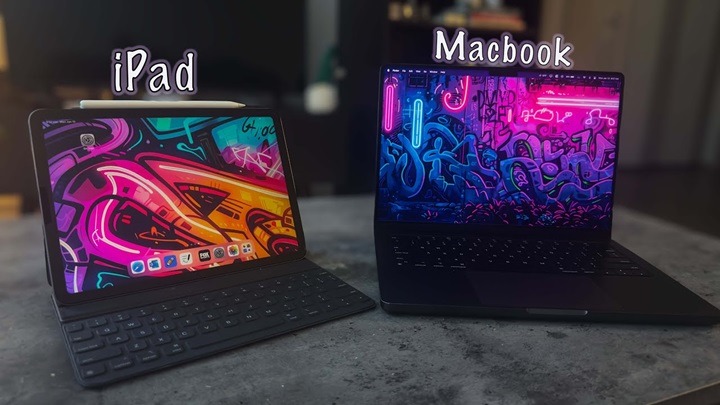
Choosing between the MacBook Air and the iPad Pro can be tricky. Both devices offer incredible performance, beautiful displays, and modern designs.
However, depending on your needs, one might suit you better than the other.
In this guide, we’ll break down the key differences between the MacBook Air and iPad Pro to help you make the best choice in 2025.
Overview: MacBook Air and iPad Pro
MacBook Air
The MacBook Air is Apple’s ultra-light, ultra-portable laptop powered by the latest M2 chip.
It’s designed for students, professionals, and everyday users who want the full macOS experience in a sleek, powerful device.
- Traditional laptop design
- Full macOS desktop operating system
- Up to 18 hours of battery life
iPad Pro
The iPad Pro is Apple’s most powerful tablet, offering almost laptop-level performance with the flexibility of iPadOS.
Paired with accessories like the Magic Keyboard and Apple Pencil, it can transform into a workhorse for creative professionals and on-the-go users.
- Tablet-first design with optional keyboard
- Runs on iPadOS
- Touchscreen and Apple Pencil support
Design and Portability
MacBook Air Design
- Slim, wedge-shaped aluminum body
- 13.6-inch or 15.3-inch Retina display
- Lightweight (2.7 to 3.3 pounds depending on model)
- Traditional clamshell form factor
The MacBook Air is made for users who prefer a classic laptop setup with a built-in keyboard and trackpad.
iPad Pro Design
- Ultra-thin tablet form
- Available in 11-inch and 12.9-inch Liquid Retina displays
- Lighter and even more portable (around 1 to 1.5 pounds without accessories)
- Works with detachable Magic Keyboard and Apple Pencil
If maximum portability and a touch interface are important to you, the iPad Pro takes the lead.
Performance and Power
MacBook Air Performance
Powered by the M2 chip, the MacBook Air handles tasks like:
- Office productivity
- Light video editing
- Music production
- Coding and web development
It offers a fanless design, so it stays silent even during heavy workloads.
iPad Pro Performance
The iPad Pro runs on the M2 chip as well, delivering performance similar to the MacBook Air.
It excels in:
- Graphic design
- 3D modeling
- Video editing using apps like LumaFusion and Procreate
- Augmented Reality (AR) applications
However, iPadOS limits certain desktop-level software you might find on macOS.
Software and App Experience
MacBook Air macOS
The MacBook Air runs macOS Ventura or later, giving you:
- Full desktop browsing and file management
- Access to professional-grade apps like Final Cut Pro, Xcode, and Photoshop
- Better multitasking with multiple windows and external display support
iPad Pro iPadOS
iPadOS offers a touch-friendly interface with:
- App Store apps optimized for tablet use
- Stage Manager for better multitasking
- Native Apple Pencil support
- Limited traditional file system compared to macOS
If you rely on desktop applications daily, the MacBook Air is still more flexible.
Keyboard and Input Experience
MacBook Air Keyboard
- Built-in Magic Keyboard with excellent key travel and tactile feedback
- Large Force Touch trackpad
- Traditional typing experience for long writing or coding sessions
iPad Pro Keyboard
- Magic Keyboard (sold separately) with trackpad support
- Apple Pencil for sketching, note-taking, and design work
- Touchscreen input
If you want the best typing experience out of the box, the MacBook Air wins.
If you prefer drawing, handwriting, and touch interaction, the iPad Pro shines.
Battery Life Comparison
- MacBook Air: Up to 18 hours on a full charge
- iPad Pro: Around 10 hours of web usage or video playback
For all-day performance without worrying about charging, the MacBook Air offers a slight edge.
Price and Value
MacBook Air Pricing
Starting from around $1099 for the 13-inch model and $1299 for the 15-inch version.
It includes the keyboard and trackpad built-in — no extra accessories needed.
iPad Pro Pricing
Starts at around $799 for the 11-inch model and $1099 for the 12.9-inch model.
Adding the Magic Keyboard ($349) and Apple Pencil ($129) quickly raises the total price.
When factoring in accessories, the iPad Pro can easily become more expensive than the MacBook Air.
Ideal Use Cases: MacBook Air vs iPad Pro
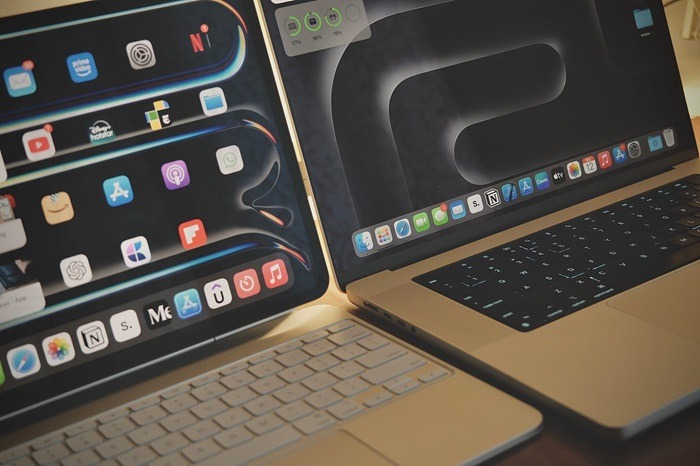
Choose MacBook Air if You Need
- A full desktop operating system
- Heavy multitasking and app switching
- Traditional typing and trackpad experience
- Coding, professional software, or desktop-grade apps
Choose iPad Pro if You Need
- Portability above all else
- Artistic work like drawing or design with the Apple Pencil
- Lightweight mobile computing
- Flexible setup for travel or media consumption
Future-Proofing: Which One Will Last Longer?
Both devices are built with powerful M2 chips and will receive software updates for years.
However, macOS is generally better at handling traditional workflows, while iPadOS still evolves each year toward more laptop-like behavior.
If you need a traditional computer now, the MacBook Air offers slightly better long-term usability for work.
For future touch innovations and creative flexibility, the iPad Pro is a compelling choice.
FAQs About MacBook Air vs iPad Pro
Which is better for students: MacBook Air or iPad Pro?
For note-taking and casual work, the iPad Pro shines.
For research, writing papers, and multitasking, the MacBook Air is better.
Can the iPad Pro replace a MacBook Air?
For light users, yes. But professionals needing full macOS apps may still need the MacBook Air.
Is the iPad Pro good for video editing?
Yes, with apps like LumaFusion and DaVinci Resolve, iPad Pro handles video editing very well, especially the 12.9-inch model.
Do you need a keyboard for the iPad Pro?
Not necessarily, but buying the Magic Keyboard transforms it into a laptop-like device, improving productivity significantly.
Which is more affordable: MacBook Air or iPad Pro?
When adding a keyboard and accessories, the MacBook Air often ends up being the better deal for overall value.