


Roblox has become one of the most popular online gaming platforms for millions of users worldwide. One of its standout features is the Roblox Audio Library, which allows players to enhance their games with music, sound effects, and custom audio. This article will explore how to access and utilize the Roblox Audio Library, its features, and its impact on game creation.
What is the Roblox Audio Library?
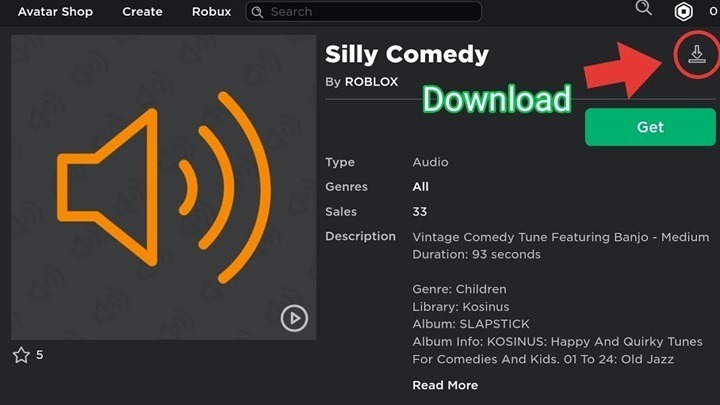
The Roblox Audio Library is a vast collection of user-generated and pre-approved audio files that players can use in their Roblox games. It includes a wide range of sounds, from background music to sound effects, enabling game developers to create more immersive and engaging experiences for players.
This resource is essential for creators who wish to enhance their games with high-quality soundtracks or incorporate unique sound effects without having to upload their own files.
Types of Audio in the Roblox Audio Library
There are several types of audio available in the Roblox Audio Library, catering to different aspects of game development. Here are the main categories:
- Music – These are tracks suitable for background music in games, events, or specific game scenes.
- Sound Effects – These audio files include sound effects like footsteps, explosions, character sounds, and other interactive elements.
- Voice Lines – Voice clips that can be used for character dialogue or interactive prompts.
- Loops – Audio that repeats, often used for background music or ambient sounds.
Accessing the Roblox Audio Library
To access the Roblox Audio Library, you need to have a Roblox account and be logged in. Here’s how you can do it:
- Go to the Roblox website or open the Roblox Studio.
- Click on the Create tab to enter the Developer Console.
- From the console, click on the Library section.
- Under the Audio tab, you will see a variety of audio files available for use.
You can search for specific tracks or browse categories to find audio that fits your game’s theme or atmosphere.
How to Upload Audio to the Roblox Library
While Roblox offers a variety of audio files in its library, you might want to upload your own custom sounds or music. To upload audio to the Roblox Audio Library, follow these steps:
- Ensure the file is in an accepted format – Roblox supports audio files in MP3, WAV, and OGG formats. The maximum file size is 20MB.
- Go to the Create tab – In Roblox Studio, navigate to the Create section on the website.
- Upload your file – Click on the Audio section, select Upload Audio, and choose your file.
- Set a title and description – You’ll be prompted to add a name and a description for your uploaded audio.
- Save and publish – Once uploaded, your audio will be available in your inventory and can be used in any of your games.
Once your audio is uploaded, it will be reviewed by Roblox to ensure it follows their guidelines. If it meets the requirements, it will be made available for use.
Best Practices for Using the Roblox Audio Library
To get the most out of the Roblox Audio Library, there are a few best practices you should follow:
- Choose audio that matches the game’s theme – Whether you’re creating a horror game or a racing simulator, make sure the audio aligns with the atmosphere you want to create.
- Avoid overloading with sounds – Too many sounds or too loud of background music can distract players. Use sound effects strategically.
- Consider the file size – Larger audio files can increase load times and affect game performance. Keep audio files optimized for faster load times.
How to Use Roblox Audio in Your Game
Once you have chosen the audio you want from the Roblox Audio Library, using it in your game is simple. Here’s how:
- Open Roblox Studio – This is where you will build and edit your game.
- Find the Audio – In the Explorer panel, find the Sound object under the Workspace or in any part of your game where you want to use it.
- Insert the Sound – Click the + icon and select Sound. Then, paste the URL of the audio you want to use from the Audio Library.
- Set properties – You can modify properties like Volume, Looping, and Playback Speed to customize the audio for your game.
- Test your game – Before publishing, playtest your game to ensure the audio fits the game’s design and enhances the experience.
Roblox Audio Library’s Impact on Game Creation
The Roblox Audio Library has had a significant impact on the game creation process on the platform. It allows developers to:
- Save time – Instead of creating or searching for audio files, developers can easily access a vast collection of sounds.
- Enhance creativity – The wide variety of available sounds enables game developers to add more personality to their creations, making games more immersive and interactive.
- Collaborate – The ability to use audio created by other developers fosters collaboration and the sharing of creative ideas within the Roblox community.
Monetizing Your Audio on Roblox
If you’re a music creator or sound designer, you can potentially make money by uploading your audio files to the Roblox Audio Library. Developers often purchase audio for their games, and you can earn Robux for each download or usage. Here’s how monetization works:
- Set a price for your audio – When uploading your audio, you can choose to make it free or set a price in Robux.
- Get paid – When other developers use your audio in their games, you’ll receive Robux as payment.
- Be mindful of copyright – Make sure that your audio doesn’t infringe on any copyrights, as Roblox strictly enforces copyright laws.
Frequently Asked Questions (FAQs)
What type of audio can I use in Roblox?
You can use a variety of audio types, including background music, sound effects, voice lines, and loops.
How do I upload custom audio to Roblox?
You can upload audio by going to the Create section of Roblox, selecting Audio, and following the upload instructions. Ensure the file is in a supported format and under 20MB.
How can I find specific audio in the Roblox Library?
Use the search bar in the Library section of Roblox Studio to find specific audio. You can filter by categories such as music, sound effects, and more.
Can I monetize my audio on Roblox?
Yes, you can monetize your audio by uploading it to Roblox and setting a price. Developers can purchase your audio for use in their games.
What is the maximum file size for audio uploads?
The maximum file size for audio uploads is 20MB, and the supported file formats include MP3, WAV, and OGG.
The Roblox Audio Library is an invaluable resource for game developers, offering a wide range of sounds, music, and sound effects to enhance game creation. By utilizing the library, uploading custom audio, and following best practices, developers can create more immersive experiences for players. With the ability to monetize audio, the library also provides opportunities for audio creators to earn Robux. Whether you’re a beginner or an experienced developer, the Roblox Audio Library is a tool that can elevate your game design and creativity.