

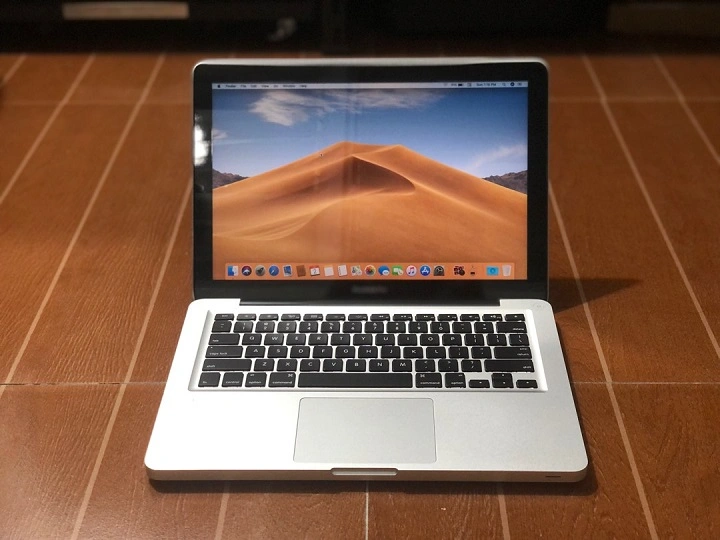
The MacBook Pro 2012 remains one of Apple’s most beloved and longest-lasting laptops. Known for its upgradeability, durable design, and wide range of ports, it has built a legacy of reliability that many modern MacBooks can’t replicate. Even in 2025, this laptop finds relevance among students, professionals, and tech enthusiasts seeking a dependable device at a budget-friendly price.
This in-depth review covers its features, performance, upgrade options, compatibility, and real-world use cases—everything you need to know about using the MacBook Pro 2012 today.
Durable Unibody Design That Aged Gracefully
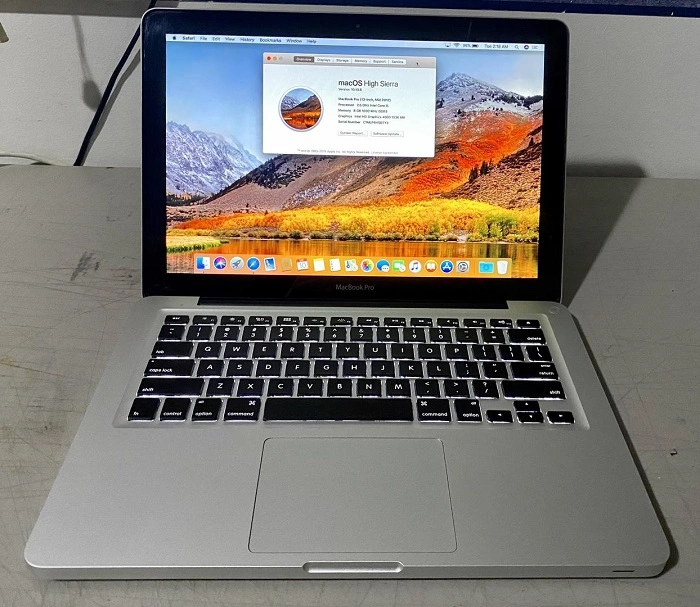
Timeless Aluminum Build
The MacBook Pro 2012 features Apple’s iconic unibody aluminum chassis. It feels solid and premium even by modern standards. The structure holds up well under pressure, making it suitable for long-term use, travel, and daily commuting.
Practical Size and Weight
Although slightly heavier than today’s slimline models, the weight of 4.5 lbs (13-inch model) and 5.6 lbs (15-inch model) adds to its stability. The thickness allows room for more thermal efficiency and easier hardware access.
Full Set of Ports for Maximum Connectivity
No Dongles Required
The MacBook Pro 2012 includes nearly every port you could ask for. This includes:
- Two USB 3.0 ports
- One Thunderbolt port
- FireWire 800
- Gigabit Ethernet
- SDXC card reader
- Audio in/out jack
- MagSafe power port
- DVD SuperDrive
This level of connectivity is unmatched in today’s MacBook lineup, making this model perfect for professionals with older peripherals or musicians using legacy hardware.
Keyboard and Trackpad Experience
Comfortable Typing
The 2012 MacBook Pro features a scissor-switch keyboard—praised for its travel, reliability, and comfort. Writers, coders, and students will enjoy extended typing sessions without fatigue.
Responsive Trackpad
Its multi-touch glass trackpad supports intuitive gestures such as pinch-to-zoom, mission control, and swipe between full-screen apps. Even now, it feels fluid and responsive.
Display and Visuals
Crisp but Not Retina
The 13-inch version offers a 1280×800 resolution, while the 15-inch model has a 1440×900 resolution. While not as sharp as today’s Retina displays, the screen provides good brightness and decent color accuracy. It’s sufficient for text editing, browsing, and media playback.
External Display Support
The Thunderbolt port supports mini DisplayPort and external monitors up to 2560×1600, useful for dual-screen workflows.
Performance in 2025
Capable with Upgrades
The MacBook Pro 2012 shipped with Intel’s Ivy Bridge i5 or i7 processors. With factory specs, it can handle web browsing, word processing, and basic media playback. However, upgrading to an SSD and 8GB–16GB RAM dramatically improves performance, making the machine viable for:
- Office tasks
- Coding and compiling
- Light photo/video editing
- Streaming and media use
Best with macOS Catalina
Apple officially supports macOS Catalina (10.15) on this model. With third-party patchers, some users run Monterey or even Ventura, but with varied stability. For best compatibility, Catalina offers a reliable and secure environment with support for most apps.
Upgradeability: A Rare Mac Advantage
User-Friendly Access
This is one of the last MacBooks that lets users upgrade internal components. In under 30 minutes, you can:
- Replace the hard drive with an SSD
- Add up to 16GB RAM
- Replace the battery
- Swap the DVD drive with another SSD or HDD
These upgrades breathe new life into the machine and extend its relevance well into 2025.
Battery Life and Replacement
Replaceable Battery
Originally, the MacBook Pro 2012 offered up to 7 hours of battery life. Most original batteries today are degraded, but high-quality replacements are readily available. With a new battery, you can expect 5–6 hours of active use.
Charging via MagSafe
MagSafe 1 chargers are still popular for their magnetic safety and fast charging. The charger is durable, and replacements are easy to find.
Real-World Use Cases in 2025

For Students
Reliable for note-taking, Zoom classes, typing assignments, and basic research. Its keyboard and battery life make it great for on-the-go study sessions.
For Writers and Bloggers
Distraction-free typing, compatibility with WordPress and Google Docs, and excellent keyboard feedback make this a great choice for content creators on a budget.
For Developers
Xcode, Terminal, and Visual Studio Code run well. Great for learning programming or handling basic software projects.
For Music and Media Lovers
Still compatible with Logic Pro X and GarageBand. The DVD drive is useful for digitizing old media collections.
For Casual Users
Perfect for web browsing, YouTube, Netflix, email, and simple tasks.
Pros and Cons of the MacBook Pro 2012
Pros
- Fully upgradeable RAM and storage
- Excellent build quality
- Comfortable keyboard and trackpad
- Full-size ports (no dongles)
- Affordable price
- Easily replaceable battery
Cons
- No Retina display
- Slightly heavy and thick
- Limited macOS support without patches
- Aging CPU for power-intensive tasks
- No USB-C or Thunderbolt 3
Who Should Buy It in 2025?
The MacBook Pro 2012 is ideal for users looking for a low-cost Mac for writing, studying, casual work, or media consumption. It’s also great as a backup laptop or for tech-savvy individuals who enjoy upgrading their machines.
For anyone who wants a newer macOS experience, Retina display, or native support for Apple Silicon apps, a more recent MacBook would be the better option.
FAQs About MacBook Pro 2012
Can the MacBook Pro 2012 still be used in 2025?
Yes. With upgrades like SSD and RAM, it can still handle modern apps and daily tasks effectively.
How much RAM can the MacBook Pro 2012 support?
Officially 8GB, but many users successfully install and run 16GB.
What is the best macOS version for the MacBook Pro 2012?
macOS Catalina (10.15) is the latest official version supported. Newer versions can be installed with third-party tools but may lack stability.
Can I replace the hard drive in the MacBook Pro 2012?
Yes. Replacing the hard drive with an SSD significantly boosts speed and performance.
Is the MacBook Pro 2012 still worth buying?
Yes, if you want a low-cost Mac with upgrade options and solid performance for basic tasks.