

If you’re a regular Aldi shopper and wondering, does Aldi have Apple Pay?, you’re definitely not alone. In today’s digital world, contactless payments like Apple Pay are becoming increasingly popular for their speed, convenience, and safety. Aldi, known for its budget-friendly groceries and streamlined shopping experience, has also embraced digital wallet technology—but with a few key points you need to know before tapping your phone at checkout.
This article covers everything you need to know about using Apple Pay at Aldi, including where it’s accepted, how to use it properly, and what limitations exist.
Does Aldi Accept Apple Pay In-Store?
The good news for iPhone and Apple Watch users is yes, Aldi does accept Apple Pay at all its physical store locations across the United States. In fact, Aldi was among the early adopters of contactless payment systems as part of its effort to create faster, more efficient checkout experiences.
Apple Pay can be used at:
- Checkout counters at all U.S. Aldi locations
- Self-checkout terminals (where available)
- With iPhone or Apple Watch using Face ID, Touch ID, or passcode
To use it, simply hold your device near the contactless reader and follow the prompts on your screen to complete the transaction.
Can You Use Apple Pay for Online Aldi Orders?
While Apple Pay is supported for in-store shopping, Aldi does not currently allow Apple Pay for online grocery orders placed via their website or through Instacart. If you plan to order groceries online, you’ll need to use alternative payment methods like credit or debit cards.
Instacart payment options typically include:
- Visa, Mastercard, and American Express
- Debit cards
- Prepaid cards
- EBT (in select areas)
This is an important detail to remember if you were planning to shop online and wanted to use Apple Pay for checkout.
Benefits of Using Apple Pay at Aldi
There are several reasons why using Apple Pay at Aldi can enhance your shopping experience, especially in today’s hygiene-conscious world.
1. Speed and Convenience
Apple Pay transactions are significantly faster than using a physical card or cash. This makes your checkout quicker, which is consistent with Aldi’s high-efficiency service model.
2. Increased Security
Apple Pay uses biometric authentication and dynamic encryption to secure transactions. Your card number is never shared with the retailer, making it a safer choice.
3. No Need to Carry Cards or Cash
You can leave your wallet at home and still complete your shopping trip with just your phone or Apple Watch.
4. Easier Budgeting with Wallet Integration
Apple Pay works seamlessly with the Apple Wallet app, letting you track your expenses and receive transaction alerts in real-time.
Step-by-Step Guide: How to Use Apple Pay at Aldi
If you’ve never used Apple Pay before, setting it up and using it at Aldi is simple.
- Add your card to the Apple Wallet app (Settings > Wallet & Apple Pay > Add Card)
- Verify the card with your bank if prompted
- Shop as usual at your nearest Aldi store
- At checkout, double-click your side button (on iPhone or Apple Watch)
- Authenticate using Face ID, Touch ID, or your device passcode
- Hold your device near the contactless reader
- Wait for the confirmation beep or vibration
After this, your transaction will be completed in seconds, and a digital receipt will be stored in your Wallet app.
Limitations of Using Apple Pay at Aldi
While in-store support for Apple Pay is strong, there are a few limitations worth keeping in mind.
- No Apple Pay online: Not available on Aldi’s site or Instacart
- Some discounts or loyalty programs may not auto-apply
- International Aldi stores may have different policies
Always check with your local store if you’re shopping outside the United States.
What If Apple Pay Doesn’t Work at Aldi?
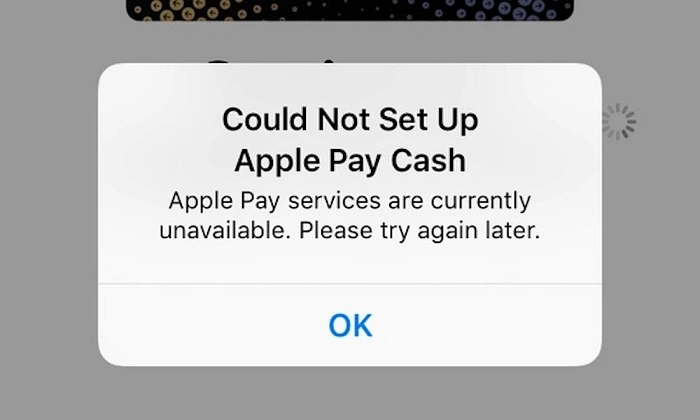
If you’ve set up everything correctly but Apple Pay is still not working at checkout, here are a few things you can check:
- Ensure your device has sufficient battery
- Confirm Face ID or Touch ID is functioning
- Check that the card is not expired
- Try restarting your device before trying again
- Ask the cashier if the terminal supports contactless payments (very rare issue)
Also, keep a backup payment method on hand in case there’s a temporary tech glitch.
Comparison Table: Aldi Payment Methods
| Payment Method | In-Store | Online (via Instacart) |
| Apple Pay | Yes | No |
| Google Pay | Yes | No |
| Samsung Pay | Yes | No |
| Debit/Credit Cards | Yes | Yes |
| Cash | Yes | No |
| EBT (SNAP) | Yes | Select Areas |
| Gift Cards | Yes | No |
FAQs About Using Apple Pay at Aldi
Does Aldi have Apple Pay at self-checkout?
Yes, Aldi accepts Apple Pay at self-checkout machines, where available. Just tap your iPhone or Apple Watch on the terminal.
Can I use Apple Pay at Aldi online?
No, Apple Pay is not accepted for online orders or delivery services through Instacart or Aldi’s website.
Is Apple Pay safe to use at Aldi?
Absolutely. Apple Pay uses secure encryption and does not store or share your card number, making it safer than swiping a physical card.
Do Aldi stores in other countries accept Apple Pay?
Apple Pay support may vary by country. In the U.S., all stores support it. In other countries, check with local Aldi customer service.
Does Aldi charge extra fees for using Apple Pay?
No, there are no additional charges for using Apple Pay at Aldi. It functions the same as a credit or debit card transaction.
Final Thoughts
So, does Aldi have Apple Pay? Yes, and it’s a great way to speed up checkout while keeping your information secure. Just make sure you’re shopping in-store, as online orders through Instacart currently don’t support Apple Pay. With the added convenience, safety, and ease-of-use, Apple Pay is a great companion for your next grocery run at Aldi.
Whether you use an iPhone, Apple Watch, or another Apple device, you’ll be able to enjoy a modern shopping experience without fumbling for cards or cash. Give it a try next time you’re at Aldi and experience a smarter, faster way to pay.