

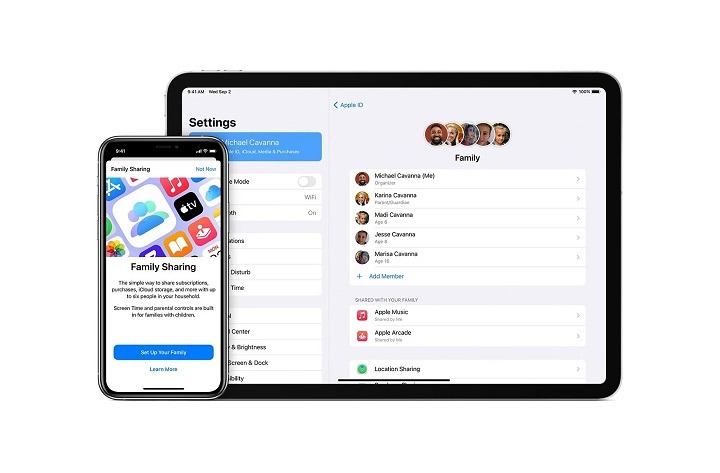
In today’s digital age, music has become an integral part of our lives, providing a soundtrack to our everyday moments and memories. With the advent of streaming services like Apple Music, accessing a vast library of songs and playlists has never been easier. However, for families who share a love for music, individual subscriptions can quickly add up. Enter Family Sharing on Apple Music—a feature that allows up to six family members to enjoy unlimited access to Apple Music for a single monthly fee. In this comprehensive guide, we’ll delve into the world of Family Sharing on Apple Music, exploring its benefits, how to set it up, and why it’s the perfect harmony for music-loving families.
What is Family Sharing on Apple Music?
Family Sharing on Apple Music is a feature that enables multiple family members to share a single Apple Music subscription. With Family Sharing, up to six family members can enjoy unlimited access to Apple Music’s extensive catalog of songs, albums, playlists, and more, all for one monthly fee. Each family member has their own Apple ID and individual music library, allowing them to personalize their listening experience while still benefiting from the shared subscription.
Benefits of Family Sharing on Apple Music
Let’s explore some of the key benefits of Family Sharing on Apple Music:
Cost-Effective:
With Family Sharing, families can save money by pooling their resources and sharing a single Apple Music subscription. Instead of paying for multiple individual subscriptions, a single monthly fee covers the entire family, making it a cost-effective option for music-loving households.
Individualized Listening:
Despite sharing a subscription, each family member maintains their own Apple ID and personal music library. This means that everyone can create their own playlists, save favorite songs, and receive personalized recommendations based on their unique listening preferences.
Parental Controls:
Family Sharing on Apple Music includes robust parental controls, allowing parents to manage and monitor their children’s music consumption. Parents can set restrictions on explicit content, prevent unauthorized purchases, and control access to certain features, ensuring a safe and age-appropriate listening experience for younger family members.
Seamless Integration:
Family Sharing seamlessly integrates with other Apple services and devices, including iCloud, the App Store, and Apple TV. This means that family members can share purchased apps, games, movies, and TV shows, as well as access each other’s photos, calendars, and other digital content.
How to Set Up Family Sharing on Apple Music
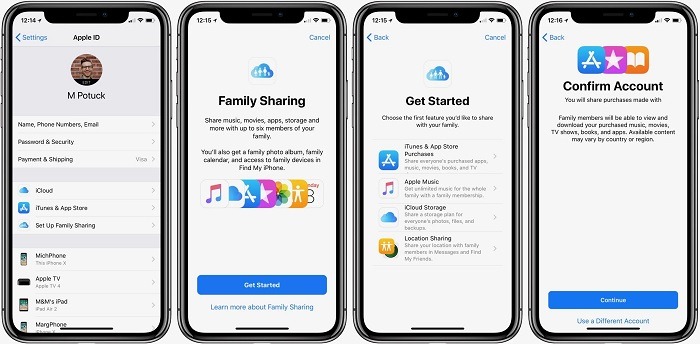
Setting up Family Sharing on Apple Music is quick and easy. Here’s how to do it:
Set Up Family Sharing
Open the Settings app on your iOS device.
Tap on your name at the top of the screen to access your Apple ID settings.
Select “Family Sharing” and follow the on-screen instructions to set up Family Sharing for your account.
Add Family Members
After setting up Family Sharing, you can invite family members to join your Family Sharing group.
Open the Settings app and tap on your name.
Select “Family Sharing” and then tap “Add Family Member.”
Follow the prompts to send invitations to your family members via iMessage or email.
Set Up Apple Music Sharing
Once family members have accepted your invitation and joined your Family Sharing group, they can access Apple Music through their own Apple ID.
- Open the Music app and navigate to the “For You” tab.
- Tap on the “Get Started” button under “Apple Music Family.”
- Follow the prompts to confirm your Family Sharing subscription and start enjoying unlimited access to Apple Music.
Tips for Maximizing Family Sharing on Apple Music
Here are some additional tips for getting the most out of Family Sharing on Apple Music:
Create Shared Playlists:
Encourage family members to create and share playlists with each other. Whether it’s a curated selection of favorite songs or a themed playlist for a special occasion, sharing playlists is a fun way to discover new music and bond as a family.
Explore Curated Content:
Take advantage of Apple Music’s curated playlists, radio stations, and exclusive content. With a wide range of genres and themes to choose from, there’s something for everyone to enjoy, from the latest hits to timeless classics.
Utilize Offline Listening:
Make use of Apple Music’s offline listening feature to download songs, albums, and playlists for offline playback. This is especially useful for family members who may not always have access to a reliable internet connection, such as during travel or outdoor activities.
Share Music Across Devices:
Family Sharing on Apple Music extends across all Apple devices, including iPhones, iPads, Macs, and Apple Watches. Encourage family members to take advantage of this seamless integration by accessing their favorite music on their preferred devices.
Related Post:
- Exploring Convenience: Can You Use Apple Pay at Subway?
- Exploring the Convenience of Apple Pay at Safeway: Everything You Need to Know
- A Comprehensive Guide to Connecting Your Apple Pencil to Your iPad
Family Sharing on Apple Music offers a convenient and cost-effective way for families to enjoy unlimited access to a world of music. With individualized listening, parental controls, and seamless integration across devices, it’s the perfect harmony for music-loving households. Whether you’re discovering new artists, sharing favorite songs, or creating memories through music, Family Sharing on Apple Music brings families together through the power of song.