

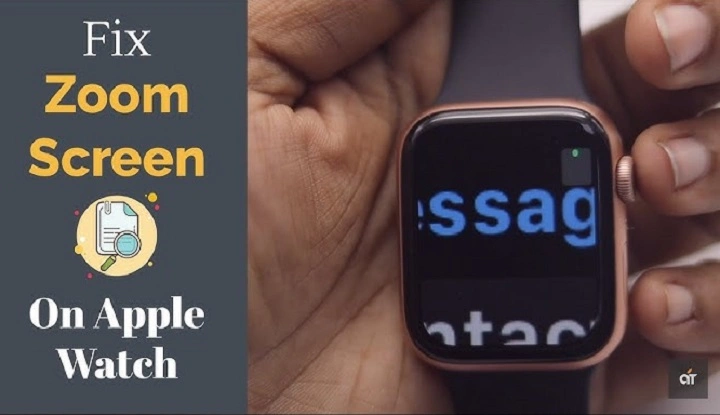
The Apple Watch is one of the most popular wearable devices globally, offering advanced features for fitness tracking, notifications, and personalization. But what if you could zoom in on the device itself? When you “zoom in” on the Apple Watch, you’re not just increasing the display size; you’re delving into the intricate details that make it an essential accessory for many. In this post, we’ll take a closer look at the Apple Watch, its functionality, design, and features that set it apart in the world of smartwatches.
The Apple Watch: An Overview
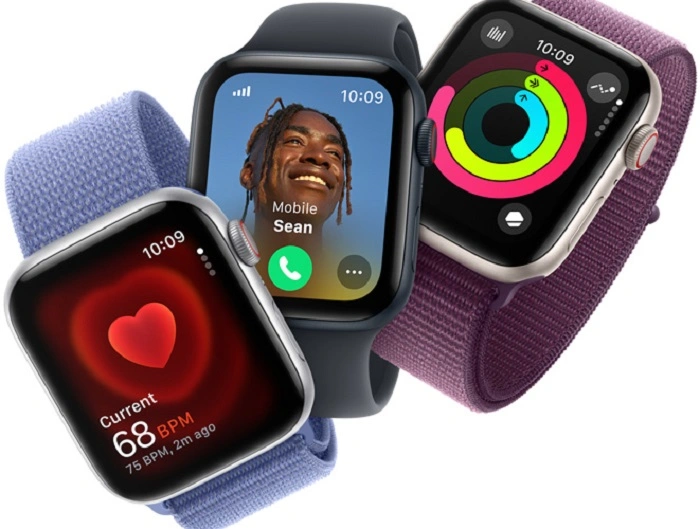
The Apple Watch, launched in 2015, has evolved significantly over the years. Each new model offers enhanced capabilities, from fitness tracking to health monitoring features, and the most recent updates continue to push the boundaries of what a smartwatch can do. Whether you’re an athlete, a professional, or someone who simply enjoys the convenience of a wearable device, the Apple Watch is built to improve your life in numerous ways.
Design and Display
At first glance, the Apple Watch’s design is sleek and modern. It features a rectangular face with curved edges and is available in various sizes, typically 40mm and 44mm for most models. The latest models even offer a larger 49mm option for users who prefer a bigger display. Apple offers several materials for the Apple Watch case, including aluminum, stainless steel, and titanium, each offering a different look and feel. The display is where the magic happens, with the Retina display offering vibrant colors and sharp clarity, even under bright sunlight.
Zooming In: Features and Functions
When we zoom in on the Apple Watch, we get to explore the impressive features and functions that make it a standout smartwatch. Here are some of the most notable ones:
1. Fitness and Health Tracking
One of the key features of the Apple Watch is its fitness tracking capabilities. It can track a wide range of activities, from walking and running to cycling and swimming. The Apple Watch uses a combination of sensors to monitor your heart rate, steps, calories burned, and distance traveled, providing you with a comprehensive overview of your daily fitness goals.
Key Fitness Features:
- Workout App: Allows you to track different activities and workouts in real-time, providing data on duration, calories burned, and other metrics.
- Heart Rate Monitoring: Continuously measures your heart rate, alerting you if it detects unusually high or low levels.
- Activity Rings: Apple Watch uses a color-coded system with three rings: Move, Exercise, and Stand. Completing each ring helps you achieve your daily fitness goals.
- Sleep Tracking: Recent models have introduced sleep tracking to help you understand your sleep patterns and improve your overall health.
2. Health Monitoring
The Apple Watch takes health monitoring to a whole new level with its advanced features. It can track vital health data and even alert you to potential health concerns.
Key Health Monitoring Features:
- ECG (Electrocardiogram): Available on Series 4 and newer, this feature allows you to take an ECG right from your wrist, potentially detecting irregular heart rhythms such as atrial fibrillation (AFib).
- Blood Oxygen Levels: With the Series 6 and later, the Apple Watch can measure your blood oxygen levels to ensure your body is getting enough oxygen to stay healthy.
- Fall Detection: Apple Watch detects hard falls and can automatically alert emergency services if you don’t respond after a fall.
3. Notifications and Connectivity
One of the main selling points of the Apple Watch is its ability to keep you connected to your world. By syncing with your iPhone, the Apple Watch provides notifications for calls, texts, emails, calendar events, and even social media updates.
Key Connectivity Features:
- Apple Pay: Use your Apple Watch to make contactless payments through Apple Pay, a secure and convenient option when shopping.
- Siri Integration: With Siri, you can use voice commands to send messages, set reminders, check the weather, or even control other smart devices in your home.
- Music and Podcasts: The Apple Watch allows you to listen to your favorite music or podcasts directly from the device, without needing your phone.
- Messages and Calls: You can send and receive text messages, make phone calls, or even respond to emails directly from your Apple Watch.
4. Customizable Watch Faces
The Apple Watch allows you to personalize your watch face with a variety of complications, colors, and designs. Whether you prefer a classic analog look or a more modern, digital design, the options are nearly limitless.
Customization Features:
- Modular Complications: You can add complications to your watch face to display information like weather, activity levels, or your next calendar appointment.
- Dynamic Faces: You can choose watch faces that change based on time of day, location, or even your mood.
- Third-Party Apps: Download additional watch faces from the App Store to further personalize your device.
5. Battery Life and Charging
Battery life is one area where the Apple Watch could improve, but the device is designed to last an entire day with typical usage. On average, the Apple Watch offers 18 hours of battery life, which is sufficient for daily activities.
Battery Features:
- Fast Charging: Recent models have introduced fast charging, allowing the Apple Watch to charge up to 80% in around 45 minutes.
- Low Power Mode: Low Power Mode helps to extend battery life by disabling non-essential features such as the always-on display.
Zoomed-In on the Design
The design of the Apple Watch has always been sleek and modern, but Apple continues to innovate with new materials, finishes, and sizes. Here’s a look at some of the design aspects that make the Apple Watch stand out:
- Display: The Apple Watch display is always on (for newer models), providing easy access to time, notifications, and other key information at a glance.
- Durability: The watch is built to withstand the elements, with options like swimproof, water-resistant, and even crack-resistant displays.
- Bands: Apple Watch bands are highly customizable, with a wide range of styles, colors, and materials. From the classic sport band to the elegant leather loops, there’s a band for every occasion.
When you zoom in on the Apple Watch, you uncover a world of possibilities for fitness, health, and connectivity. From its advanced health tracking features like ECG and blood oxygen monitoring to its customizable watch faces and seamless integration with the Apple ecosystem, the Apple Watch has proven to be one of the most powerful smartwatches on the market. Whether you’re looking for a stylish accessory, a fitness companion, or a device to help you stay connected, the Apple Watch has you covered.