

In the world of personalizing your MacBook Air, changing the wallpaper is one of the simplest yet most impactful ways to express your style and personality. Whether you prefer serene landscapes, abstract art, or vibrant patterns, your wallpaper sets the tone for your digital workspace. In this comprehensive guide, we will explore everything you need to know about changing the wallpaper on your MacBook Air, from basic steps to advanced customization options.
Getting Started: Understanding Wallpaper Basics
Before diving into the customization process, let’s start with the fundamentals of wallpapers on MacBook Air.
What is a Wallpaper?
A wallpaper, also known as a desktop background, is the image or pattern displayed on the desktop of your MacBook Air. It serves as the backdrop for your icons, files, and applications, enhancing the visual appeal of your computer’s interface.
Why Change Your Wallpaper?
Changing your wallpaper allows you to personalize your MacBook Air and create a workspace that reflects your mood, interests, and aesthetic preferences. Whether you’re looking to add a splash of color, evoke a sense of calm, or showcase your favorite artwork, the right wallpaper can transform your desktop experience.
Finding the Perfect Wallpaper
Now that you understand the importance of wallpapers let’s explore the various methods for finding the perfect wallpaper for your MacBook Air.
Built-in Wallpapers
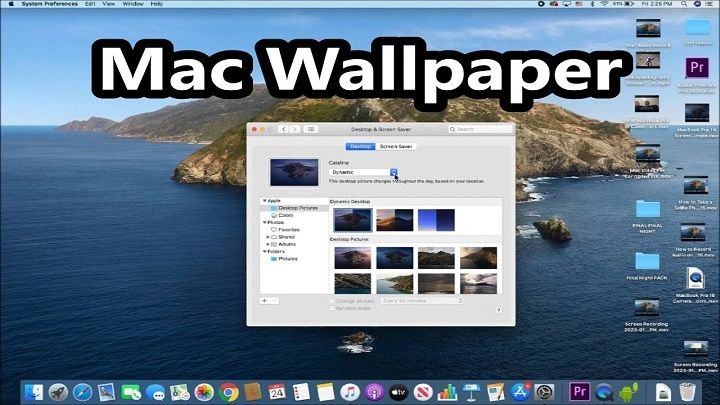
MacBook Air comes with a selection of built-in wallpapers, ranging from nature landscapes to abstract designs. To access these wallpapers, follow these steps:
- Click on the Apple menu in the top-left corner of your screen.
- Select “System Preferences” from the dropdown menu.
- Choose “Desktop & Screen Saver.”
- Browse through the available categories and select the wallpaper that appeals to you.
- Online Resources
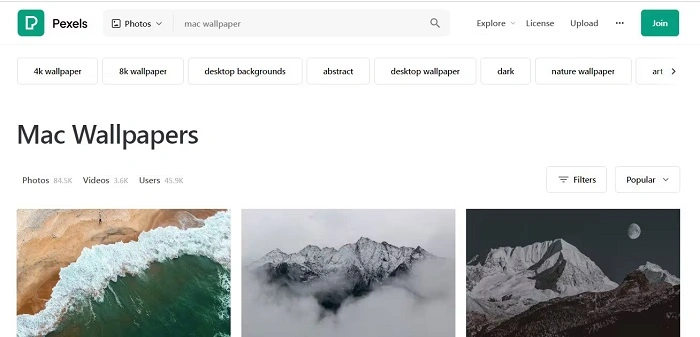
There are countless websites and online platforms where you can find high-quality wallpapers for free. Some popular options include:
- Unsplash
- Wallpaper Abyss
- Pexels
- DeviantArt
Create Your Own
If you’re feeling creative, why not design your own wallpaper? You can use graphic design software like Adobe Photoshop or online tools like Canva to create custom wallpapers tailored to your preferences.
Changing Your Wallpaper: Step-by-Step Guide
Now that you’ve chosen the perfect wallpaper, it’s time to change it on your MacBook Air. Follow these simple steps:
Open System Preferences
Click on the Apple menu in the top-left corner of your screen and select “System Preferences” from the dropdown menu.
Choose Desktop & Screen Saver
In the System Preferences window, click on “Desktop & Screen Saver” to access the wallpaper settings.
Select a Wallpaper
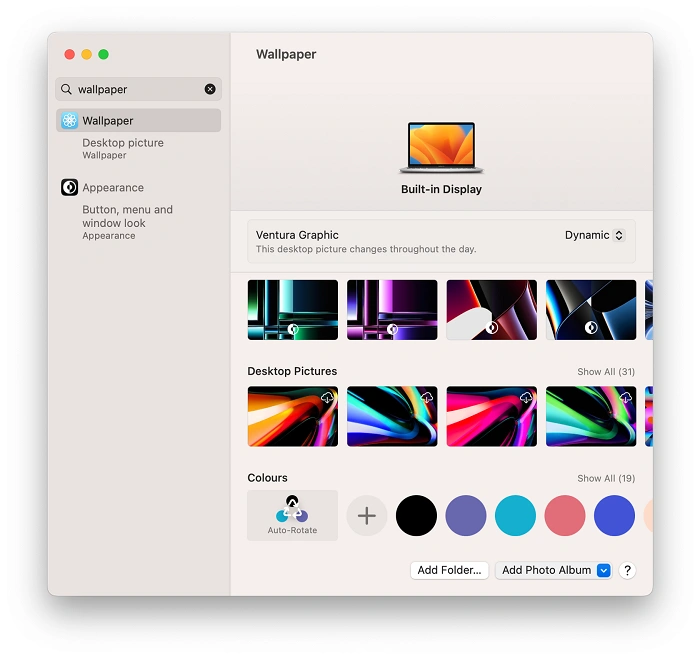
In the Desktop & Screen Saver window, you’ll see a list of available wallpapers on the left side of the screen. Click on the thumbnail of the wallpaper you want to use to select it.
Adjust Wallpaper Settings (Optional)
You can further customize your wallpaper by adjusting the settings such as picture position (fill screen, fit to screen, stretch to fill screen, etc.) and screen saver preferences.
Close System Preferences
Once you’re satisfied with your wallpaper selection and settings, close the System Preferences window. Your new wallpaper will now be displayed on your MacBook Air desktop.
Advanced Wallpaper Customization
For those looking to take their wallpaper customization to the next level, here are some advanced tips and tricks:
Dynamic Wallpapers
MacOS Mojave and later versions offer dynamic wallpapers that change throughout the day based on the time of day. To enable dynamic wallpapers, go to System Preferences > Desktop & Screen Saver > Desktop and select “Dynamic Desktop” from the list of options.
Third-Party Wallpaper Apps
Explore third-party apps available on the Mac App Store that offer a wide range of wallpapers and additional customization features. Some popular apps include Wallpaper Wizard and Irvue.
Automate Wallpaper Changes
If you like to switch up your wallpaper frequently, consider using a wallpaper management app like Irvue or Wallpaper Wizard. These apps allow you to automate wallpaper changes at set intervals, keeping your desktop fresh and inspiring.
Changing the wallpaper on your MacBook Air is a simple yet powerful way to personalize your digital workspace. Whether you prefer serene landscapes, abstract art, or dynamic wallpapers that change throughout the day, the options are endless. By following the steps outlined in this guide, you can easily change your wallpaper and explore advanced customization options to create a desktop environment that truly reflects your style and personality. So go ahead, revamp your MacBook Air and make it uniquely yours!
Exploring Wallpaper Trends and Inspiration
In the ever-evolving world of digital design, wallpaper trends come and go, influenced by factors such as technology advancements, cultural movements, and artistic innovations. Let’s explore some of the latest wallpaper trends and sources of inspiration to help you stay ahead of the curve.
Minimalism
Minimalist wallpapers have gained popularity in recent years, reflecting a desire for simplicity and clarity in design. These wallpapers often feature clean lines, subtle textures, and muted colors, creating a sense of calm and tranquility on your desktop.
Nature and Scenery
Nature-inspired wallpapers continue to be a timeless favorite among users, with scenic landscapes, lush forests, and serene beaches providing a refreshing escape from the digital world. Whether you’re a nature enthusiast or simply appreciate the beauty of the great outdoors, there’s a wide range of nature wallpapers to suit your taste.
Abstract Art
For those who prefer a more avant-garde approach to wallpaper design, abstract art wallpapers offer a visually stimulating alternative. From geometric patterns to fluid shapes and vibrant colors, abstract wallpapers can add a bold and dynamic touch to your desktop.
Vintage and Retro
Nostalgia is a powerful force in design, and vintage and retro wallpapers evoke a sense of nostalgia for bygone eras. Whether you’re drawn to the psychedelic patterns of the 1960s or the neon aesthetics of the 1980s, vintage-inspired wallpapers can add a touch of retro charm to your MacBook Air.
Typography and Quotes
Typography wallpapers featuring inspirational quotes, motivational phrases, and uplifting messages have become increasingly popular in recent years. These wallpapers not only serve as a source of encouragement and motivation but also add a personal touch to your desktop.
Seasonal Themes
Celebrate the changing seasons with seasonal-themed wallpapers that reflect the beauty and essence of each time of year. From festive holiday wallpapers to cozy autumnal scenes, seasonal themes can help you embrace the spirit of the season and infuse your desktop with seasonal flair.
Customization and Personalization
Ultimately, the beauty of wallpaper customization lies in its ability to reflect your unique personality and preferences. Whether you’re an art aficionado, a nature lover, a minimalist enthusiast, or a fan of all things retro, there’s a wallpaper out there to suit your style. Don’t be afraid to experiment with different wallpapers and customization options until you find the perfect fit for your MacBook Air.
Tips for Optimal Wallpaper Display
Once you’ve chosen the perfect wallpaper for your MacBook Air, here are some tips to ensure optimal display and visual appeal:
Resolution Matters
Ensure that your wallpaper is sized correctly to match the resolution of your MacBook Air’s display. Using a wallpaper with the correct resolution will prevent stretching, distortion, or pixelation, resulting in a crisp and clear image.
Consider Aspect Ratio
Consider the aspect ratio of your MacBook Air’s display when selecting a wallpaper. For example, if your MacBook Air has a widescreen display with a 16:10 aspect ratio, choose a wallpaper with a similar aspect ratio to ensure proper alignment and composition.
Test Different Options
Don’t be afraid to test out different wallpapers and customization options to find the perfect combination for your MacBook Air. Experiment with different themes, styles, and settings until you find a combination that resonates with you and enhances your desktop experience.
Changing the wallpaper on your MacBook Air is a simple yet effective way to personalize your digital workspace and create an environment that reflects your style, interests, and personality. Whether you prefer minimalist designs, nature-inspired landscapes, abstract art, or vintage aesthetics, there’s a wallpaper out there to suit your taste. By staying informed about the latest wallpaper trends and sources of inspiration, experimenting with different options, and following best practices for display, you can create a desktop experience that is both visually stunning and uniquely yours. So go ahead, explore the world of wallpaper customization, and transform your MacBook Air into a reflection of your creativity and individuality!