

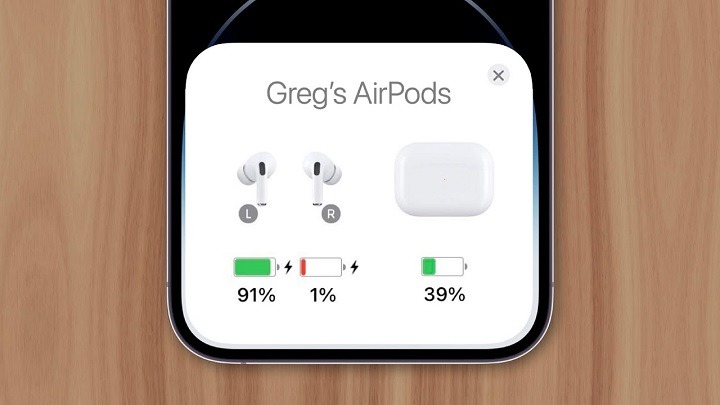
Apple’s AirPods have revolutionized the way we listen to music, make calls, and interact with our devices wirelessly. However, users may encounter an issue where one AirPod seems to drain its battery faster than the other, leading to an imbalanced listening experience. In this comprehensive guide, we’ll delve into the common reasons why one AirPod dies faster than the other, troubleshooting steps to address the issue, and tips for maintaining optimal battery life for both AirPods.
Understanding Battery Disparity in AirPods
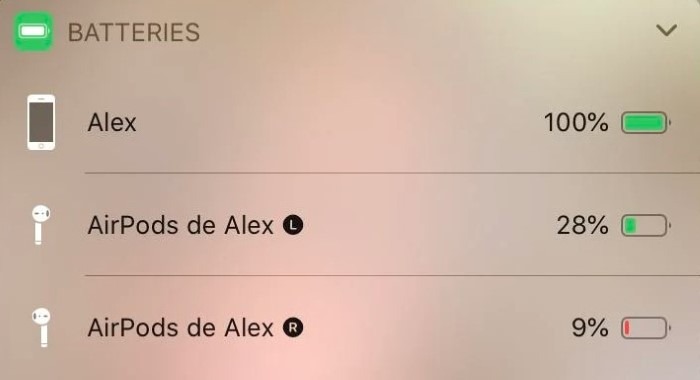
When one AirPod consistently drains its battery faster than the other, it can be frustrating and disruptive, especially during extended listening sessions. Several factors may contribute to this disparity, including hardware issues, software glitches, usage patterns, and environmental factors. By identifying the underlying cause, users can take steps to mitigate the problem and ensure a more balanced and enjoyable listening experience.
Common Reasons for Battery Imbalance in AirPods
Let’s explore some common reasons why one AirPod may die faster than the other:
- Uneven Usage Patterns: Users often have a dominant ear that they prefer to use for phone calls, listening to music, or watching videos. As a result, one AirPod may be subjected to more frequent and prolonged usage than the other, leading to faster battery depletion.
- Hardware Defects: Occasionally, one AirPod may have a hardware defect or malfunction that causes it to consume more power than its counterpart. This could be due to issues with the battery, circuitry, or other components.
- Bluetooth Connectivity Issues: Connectivity problems between the AirPods and the paired device, such as intermittent Bluetooth connections or signal interference, can cause one AirPod to work harder to maintain a stable connection, resulting in faster battery drain.
- Software Glitches: Software bugs or glitches in the firmware of the AirPods or the connected device may cause one AirPod to malfunction or operate inefficiently, leading to increased power consumption.
- Environmental Factors: Environmental conditions such as temperature extremes, humidity, or exposure to moisture can affect the performance and battery life of AirPods, potentially causing one AirPod to degrade faster than the other.
Troubleshooting Battery Imbalance in AirPods
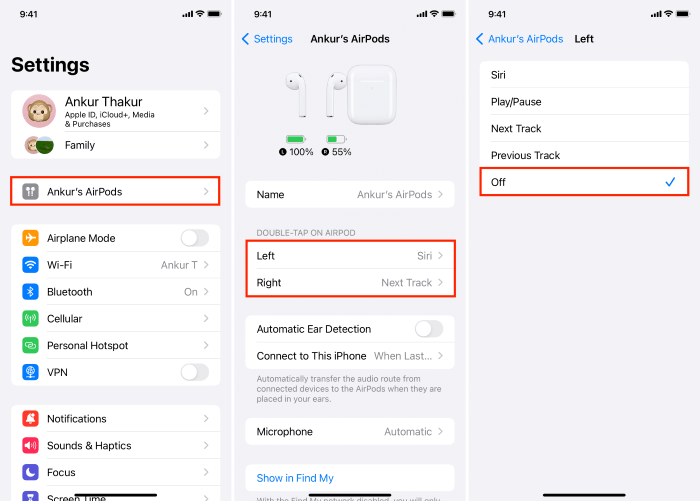
If you’re experiencing battery imbalance issues with your AirPods, here are some troubleshooting steps you can take to address the problem:
Check Usage Patterns:
Monitor your usage patterns to determine if one AirPod is being used more frequently or for longer durations than the other. Try alternating between the left and right AirPods to distribute usage more evenly.
Clean and Inspect AirPods:
Inspect both AirPods for any visible damage, debris, or blockages that may affect their performance. Clean the charging contacts, speaker grilles, and ear tips using a soft, dry cloth to ensure optimal connectivity and audio quality.
Reset AirPods:
Reset your AirPods to their factory settings by placing them in the charging case, pressing and holding the setup button on the back of the case until the status light flashes amber, and then re-pairing them with your device. This can help resolve software issues and connectivity problems.
Update Software:
Ensure that both your AirPods and the connected device (iPhone, iPad, Mac, etc.) are running the latest software version. Software updates often include bug fixes and performance improvements that can address battery imbalance issues.
Equalize Volume Levels:
Adjust the volume levels of your device to ensure that both AirPods are set to the same level. Imbalanced volume levels can cause one AirPod to work harder than the other, leading to uneven battery drain.
Test in Different Environments:
Test your AirPods in different environments to rule out environmental factors such as temperature extremes or signal interference. If battery imbalance persists in specific environments, consider adjusting your usage habits accordingly.
Tips for Maintaining Balanced Battery Life
To prevent future battery imbalance issues in your AirPods, consider implementing the following tips:
- Rotate AirPods Regularly: Alternate between the left and right AirPods to distribute usage more evenly and prevent one AirPod from consistently draining its battery faster than the other.
- Store AirPods Properly: When not in use, store your AirPods in their charging case to protect them from damage and ensure that they remain charged and ready for use.
- Keep AirPods Clean and Dry: Regularly clean your AirPods and charging case to remove dirt, debris, and moisture that may affect their performance and battery life.
- Avoid Extreme Conditions: Minimize exposure to extreme temperatures, humidity, or moisture, as these environmental factors can degrade the battery life and performance of AirPods.
- Monitor Battery Health: Use the Battery widget on your connected device or the Settings app to monitor the battery health of your AirPods and identify any issues or abnormalities.
Read More:
Unraveling the Mystery: Why Does FaceTime Keep Hanging Up?
Troubleshooting Guide: Why Can’t I Clear My History on Safari?
Troubleshooting “Zoom Unable to Install Updates Error 10002” on Mac: A Comprehensive Guide
Encountering battery imbalance issues where one AirPod dies faster than the other can be a frustrating experience for users. By understanding the common reasons for this disparity and following the troubleshooting steps outlined in this guide, you can identify and address the underlying causes of battery imbalance in your AirPods. Whether it’s adjusting usage patterns, resetting your AirPods, or updating software, proactive maintenance and troubleshooting can help you maintain balanced battery life and enjoy a more consistent listening experience with your AirPods. If you continue to experience battery imbalance despite troubleshooting, consider contacting Apple Support for further assistance or exploring warranty options for hardware defects. With the right approach, you can maximize the performance and longevity of your AirPods and enjoy uninterrupted wireless audio for years to come.